Showing posts with label Halloween DIY. Show all posts

Wednesday, August 26, 2026

Cute Ghost Laser Cut UV Print Tutorial

Getting these pocket ghosts to come out right was quite the process. First you need to find your art and make sure it's okay to use it commercially if you plan to sell the products you make with it. We found these cute ghosts on Canva and then found the corresponding files on Etsy and purchased the download that allows us to use it commercially.


The first step is to put your files into the EufyMake  software. The program is pretty forgiving, accepting many file types. We used jpegs.


To get the see-through ghost effect, we used clear 1/8" acrylic. Put the clear acrylic on the print bed, masked side down. It will make it easier to cut the ghosts out later if you don't remove the masking from the back of the acrylic at this stage.

Since you will be printing on the back of the acrylic, you'll want to put your color layer down first, and then the white layers. Here are our settings.


After these have printed, move the acrylic sheet to your laser bed. We used our XTool P3 laser which is great for cutting acrylic. 

You'll need to import the same picture files into the XTool software that you did into the EufyMake program. Once those are on your screen, offset each ghost so you have an outline. Set the outline to cut.

You can either delete your colored ghost jpegs or set them so that they are not printed.


Your laser will take a snapshot of the acrylic you have put inside. Align your cutouts with the pictures of the ghosts you printed. This is the tricky part. You'll have to eyeball it. They don't need to be perfect, but you don't want to lose any of your printed ghosts either. You can see some of the ghosts below weren't aligned just right.

For our laser and the acrylic we chose, we set the power to 80% and the speed to 10 mm/s. It cut straight through, no problems.


Pull your cuts out of the laser and peel the backing off and you'll have your ghosts all ready to put magnets on or to just have in your pocket for safe keeping. Let us know if you have any questions.


                                    Front                                                                Back


Tuesday, September 17, 2024

Easy Black Flame Candle and Sign

This candle, similar to one from Disney's Hocus Pocus cost about $6 to make and took about half an hour. We started with a simple flameless candle from Walmart ($5). If you've seen Hocus Pocus, you know that the Black Flame Candle isn't actually black. It's cream colored with designs on it. The flame is black. 


If you end up making this with a real candle, we advise you not to light it. You never know what will happen.

We found this excellent art on Pinterest and changed the color of the drawings to be more similar to the dark red color from the movie. Find the original post at  https://www.playpartyplan.com/hocus-pocus-candle/.


After printing it on sticker paper, we used a clear sheet of vinyl on the front of the sticker paper to make it more durable. We used this kind of vinyl. It's the same kind we use to coat our sticker sheets, and it works quite well, even outdoors.


The next step was burning real candles. We used two little votives and poured the melted wax from them down the sides of our flameless candle to make it look more realistic.


And there you go! Just like magic!

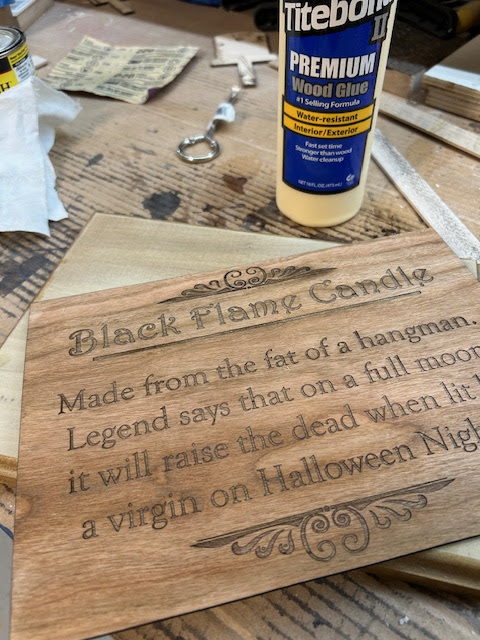
To go with the candle, we also made a sign. In the movie, Max reads the sign out loud. Even though you can't really see the sign in the movie, we imagine it looked something like this. Lightburn is our design tool of choice when we are using our wood laser.


We laser burned the sign onto 3mm cherry plywood, and then glued it to a piece of scrap wood from an earlier project to make it look more like a museum sign. Some Danish oil gave the plywood a nice finish.

Next step, put our candle and sign on display for Halloween next month!